Last year, I started teaching a high school computing foundations class that is very focused on AI. In working through things for that course and doing my own tinkering with tech that I am always up to, I learned about retrieval-augmented generation (RAG). RAG is a simple functionality that turns generative AI’s (genAI) sloppy intelligence from its large language model (LLM) into expert-level intelligence in whatever subject area you wish.
How RAG Works
As ByteByteAI’s 9 AI Concepts Explained in 7 Minutes video explains, with RAG, your AI agent retrieves documents from your RAG database first, then builds the rest of the language around it using the broad LLM. Some tech experts, such as Richard Flamsholt, author of the the must-read AI Demystified, might argue that the examples I give here are not technically a full-blown RAG model, but they are at least based on the same principle.
An LLM alone is just a program using a massive language database and probabilities to predict which text should come next. Language is structured such that, with enough of it databased, a probability model can predict its direction so well that it passes for intelligence (calling an LLM alone “AI” is more marketing than reality). This is why––in the early days of LLMs––AI was easily identifiable and a horrible research tool. Lawyers who tried to use it on cases, for example, were reprimanded by judges for having fake case citations. Studies of early from those early days showed accuracy in citations going from 2% with GPT-3.5 to 20% with GPT-4. As you can imagine, it’s a lot better today, but there are still some issues.
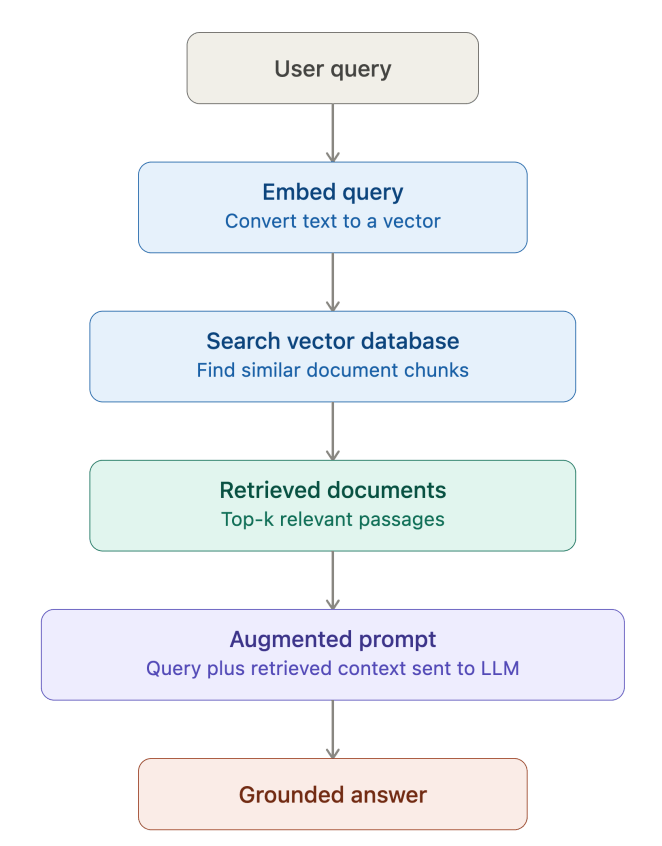
This is where RAG comes in. An LLM is just a big language database with an alignment layer on top to make sure its responses are appropriate. Research is a completely different skill that you have to layer on top of that. Asking an AI chatbot to search the internet, find relevant information, and cite it correctly is a huge undertaking that the software often gets wrong. Ask Google or ChatGPT to help you troubleshoot a software or hardware issue, and 10 minutes into the conversation, you will realize it has been giving you information on the wrong version the whole time.
With RAG, you control the documentation that the top layer of the software searches. RAG is designed to search a limited scope of data, which it can use and cite with excellent accuracy. It then uses the LLM to build the text around the information with the language needed to help you understand it.
Gemini Notebook: RAG for Beginners
I introduce RAG to my students through Gemini Notebook (formerly known as Notebook LM). Notebook is user-friendly, convenient, easy to understand, and–most importantly–free. Choose a topic that you want to create a chatbot for. Drop some resources on the left side of the screen (it will take documents, web sites, audio, YouTube videos, etc.), and start asking it questions. What you will notice about Notebook is that it is extremely good at using your sources and citing them. It is also amazing at creating study tools based on your sources. Throw in some documents from your class, and it will make interactive quizzes, flash cards, infographics, and even podcasts and videos to help you learn.
It’s too good to be true. Gemini has created a second brain! Hold on, now. As you use it more, you will notice that Notebook has some quirks and limitations. Notebook will let you add up to 50 sources, but after a dozen or so––depending on length––you will start to notice major issues. It will read the first few sources to answer a prompt and ignore the rest. As soon as it finds good enough information, it will respond to the prompt with it and spit out its answer. You will also notice issues when you ask it to do any higher level thinking.
I created a “Marching Percussion Assistant” with Gemini Notebook. I loaded in Percussive Arts Society articles, YouTube videos, judge commentary, clinic notes, etc. I asked it to plan out a rehearsal for my drumline based on what part of the season we were in and what issues we had at the last performance. It gave me a great rehearsal plan, and I actually used some of it the next weekend. Later on, I asked it to help me with show design, and the results were not so good. It pulled some direct quotes from my sources about broad ideas like pacing, but it couldn’t generate any actual useful ideas.
The Linear Digressions podcast episode about RAG explains a couple issues that often affects RAGS. One is that RAGs do not tend to be good at searching the entire library of resources, especially if it is a large library. It will check the first several chunks of data, and as soon as it finds what it is looking for, it uses that to answer the prompt. It also struggles to understand multi-step reasoning. Pieces of information located in different documents that are related to each other may not be noticed in RAG. It’s more of a search tool than a processor of information. It is great at finding things, but it processes it without deep, nuanced understanding.
If we want RAG to be able to handle deep research and idea generation, we are going to need an AI program that has more agency. You have probably noticed that all of a sudden people won’t shut up about “AI agents”, so the technology is there. Enter Claude.
Next Level RAG: Claude Projects and Better Data Chunking
I recently started using Claude more because I like several of the company’s approaches better than those of OpenAI, Meta, Grok, etc. I was interested in Claude Code, which one of my colleagues was using, and I had already done some experimenting with Claude Projects, which I recognized could do RAG. I set up a Claude Pro account so that I could have Claude set up an interactive web site for my classroom (the site actually includes a rudimentary RAG chatbot built on Claude’s Haiku 4.5 model, which is designed to give “quick answers”.
When you first start using Claude Projects, it might look like a primitive version of Gemini Notebook. It only takes a few common file types, and your context folder fills up fast. I tried to recreate my marching percussion assistant to compare it with Notebook, and I was at 95% of project capacity before I was even done. I was also frustrated that I had to convert videos into text transcripts, although I realized that Notebook had just been doing that for me. I played with some prompts on the Sonnet 5 model, which is Claude’s model for “everyday tasks”. It was a better thinker than Notebook for sure, but it needed a lot of prompting to get things right, and it wasn’t digging deep enough yet. I realized that the issue was data management.
AI Demystified explains that one of my problems was file types:
PDFs are a wilderness. They’re really hard to extract text and structure from – much harder than HTML. They contain binary parts, the internal structure is a jungle beyond description of stacked objects, drawings, and text parts.
I did some research and had some conversations with Claude about how to best manage my data, and I learned some interesting facts:
- Claude reads simpler text files more easily than more complex ones, especially PDFs. One Reddit user reported he had a 97% reduction in token usage by converting PDFs to TXT.
- Claude Projects––and RAGs in general––have an easier time processing data if the related data is all in the same place.
- Markdown (.md) files allow text to have some basic formatting structure while using minimal characters so that file storage and token usage stay low.
- Claude works most efficiently if the size of these markdown files stays around 2,000-8,000 words.
- Claude reads those “chunks” of text that the Linear Digressions podcast discussed best if they are separated into bullet points, rather than long narrative chunks.
- Claude is good at converting narrative text into bulleted text and adding in-text citations to preserve the sources if you want to go back to them.
My solution:
- Convert PDFs to text format.
- Convert narrative text into bullet points (also helps remove extra junk text like introductions, tangents).
- Add citations to the bullet points if you want to be able to trace them back to their original sources.
- Organize the bullet points by topic. Each .md file focuses on a topic, and markdown-formatted headings can divide it further into subtopics.
- Create an index that lets Claude quickly find the locations of the subtopics within all these markdowns.
Claude can do every one of these tasks. The first four can all be done from one prompt, although it works best to work with a few files at a time. Over several of these prompts, Claude condensed my entire library of 20 years worth of books, articles, conference notes, webinar transcripts, etc. into a knowledge base of 19 markdown files that have around 2,000-10,000 words each, sorted by topic. This shrunk my context capacity usage down from 95% to 16%.
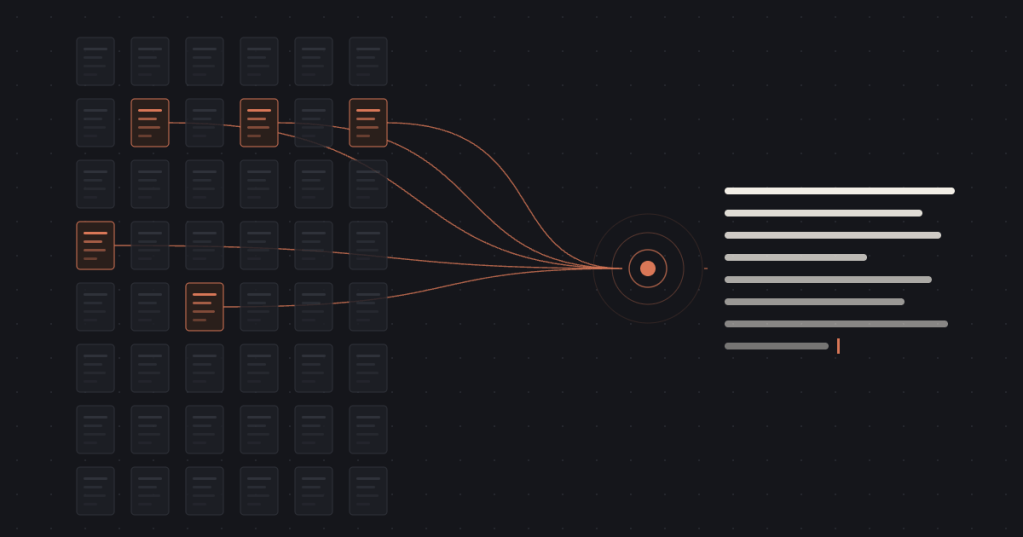
This has effectively created a vector database that Claude can efficiently search. It is fewer steps and fewer tokens for Claude to find the most relevant information. I finished this up around the same time that Anthropic released Opus 5.5, Claude’s newest model for “ambitious work”, so I put Opus 5.5 to the test. Working in my project, I gave Claude two Google Docs that my design team is using to develop our newest percussion show. I gave it some extra context and asked it to give us more design ideas, warn us about potential pitfalls, and provide advice based on the project knowledge base.
We have already established that this is a big ask. RAGs tend to struggle with even simpler multi-step requests. Now I am asking it to be creative, identify risks and flaws, and search for relevant advice all in one prompt. So how did it do?
Claude went through several commands to solve this problem. It read the 2 new documents I gave it. It scanned my project context. It read last season’s judges’ commentary to make itself aware of our weaknesses and read 4 of my knowledge base markdown files. It did some separate brainstorming on our show concept, including researching external reference materials of some kind (LLM by itself or LLM and the web). It then wrote me about five pages of ideas, concerns, and advice.
Right off the bat, the first idea was one I will absolutely use. The second idea was weird. The third idea was sensible and a good one throw onto the design list. The fourth idea showed high level problem-solving. Claude started acting like an AI agent, doing additional research beyond the docs I provided. It did high-level thinking. It gave me more to work with than I would have gotten from a 30-minute conversation with my assistant director.
Conclusion
When you combine a multi-skilled AI agent with retrieval, an LLM, and a highly organized knowledge database, you get an AI tool that has professional expertise and reasoning. Is it genuine critical thinking? We are not quite there yet, but we are not all that far off. It’s response to this prompt demonstrated a higher level of reasoning than I typically see from my high school students, but not a higher level than me (40-year old with a Master’s degree).
I used to roll my eyes when writers like Ethan Mollick––author of Cointelligence: Living and Working with AI––said things like “always invite AI to the table”, but now that I have seen what Opus 5.5 and RAG can do, I will have a Claude window open in every meeting with my design team. I have a design meeting coming up on Sunday, and I will literally have AI at the table.
Note: Anthropic’s Sonnet 5 model created the RAG flow chart image above. Opus 5.5 created the image of the text being extracted from files.


